How I Got Here
It’s been exactly 1 year and 6 months of working in the insurtech industry. In the short amount of time that I’ve been exposed to this industry, a fast-paced environment wasn’t exactly what I had imagined. We’ve all known about the rapid scene of the tech industry, but I’ve always thought that rapid scene is only applicable to tech startups or tech focused companies. The agile workflow that we adopted requires us to develop an infrastructure that is flexible, easy to maintain and somewhat worry free. The first couple of months I entered as a junior frontend developer. Yet as time went on, I’ve been tasked to handle more things other than frontends such as backend and hybrid infrastructures (well not entirely). And within a short period of time, I’ve learned countless cool things that I knew I needed to experiment with myself somehow, someday. So I decided to build the infrastructure I'd always wanted to try on my own.
The Plan
Here’s what we’re building. The setup has a gateway, monitoring tools, and containerized microservices running on Docker. We can make a list of things that we need in order to make this work. And I would be very glad if you took some inspiration from this setup or better yet, provided some feedback on it. Here's the list of components:
-
Docker
- Oftentimes, it’s a great idea to containerize your applications.
-
DNS Server
- Your own DNS server would be great. In my case, I used .tech domains. Its DNS management panel is easy to work with.
-
Gateway and Monitoring Tools
- Apache APISIX as our gateway. Why? Because it’s built on top of NGINX and is a dynamic gateway as opposed to static reverse proxy provided by NGINX only. It’s also highly configurable with plug and play plugins available.
- Grafana as our monitoring dashboard. Why? Simple to configure, works well with many data sources.
- Prometheus as our time-series metrics collection. Why? Complements Grafana and APISIX well. For example, APISIX has a built-in Prometheus plugin that exposes metrics.
- Node Exporter as our system metrics exporter. Why? Easy to set up with a compose file alongside Prometheus.
-
Databases & Database Management Tools
- PostgreSQL is my relational database of choice. Why? Because it’s flexible but strict enough. It’s just really balanced. At the time of writing, I’m still exploring other database options but this is a good starting point as is.
- pgAdmin as my database management tool, running as a container on the same VPS. Why? It integrates well with PostgreSQL and makes tasks like backing up an entire database or individual tables a breeze.
-
API Client
-
Hoppscotch is my choice. Why? Because it’s a web-based API client that I can host within my Docker network, removing the need to publicly expose my services. With the proxy server that it provides, I can also send an HTTP request with my Docker container name and it will resolve it for me.
Great, we’ve got all the components listed out. For now, that’s the infrastructure that I wanna build myself to play around with. Oh and not to mention I’m running all of the components above within their own Docker Compose configuration. It just saves me from the classic hassle of “it works locally but not on my server”.
The Execution
Yep after all that, here’s the execution part. You can also find my public repositories for each component at the end of the page if you wanna check it out for yourself.
-
Setup the Docker Network
I just learned networking on campus and it is indeed a fun thing to fiddle around with. Essentially what I did is create 4 important network subnets within Docker. Each of these subnets have a /24 subnet mask for simplicity’s sake. What are these network subnets, you might ask.
-
apisix_mgmt, is a network subnet responsible for connecting the items within Gateway and Monitoring Tools.
-
apisix_frontend, responsible for connecting APISIX with my frontends.
-
apisix_backend, responsible for connecting APISIX with my backends.
-
And last but not least, database_net, responsible for connecting my databases to my backend applications.
So as you might’ve noticed, in theory, the entire communication of this Docker environment will be done through the gateway. The frontend should, in this configuration, have no idea that backend applications or databases exist at all. And the backend application should only know that APISIX and databases exist, acting as a bridge between frontend and databases. Speaking of network, I’ve also configured that port 80 and 443 (default for HTTP and HTTPS requests) are sent to APISIX. So all traffic has to go through the gateway. Here’s how it looked:
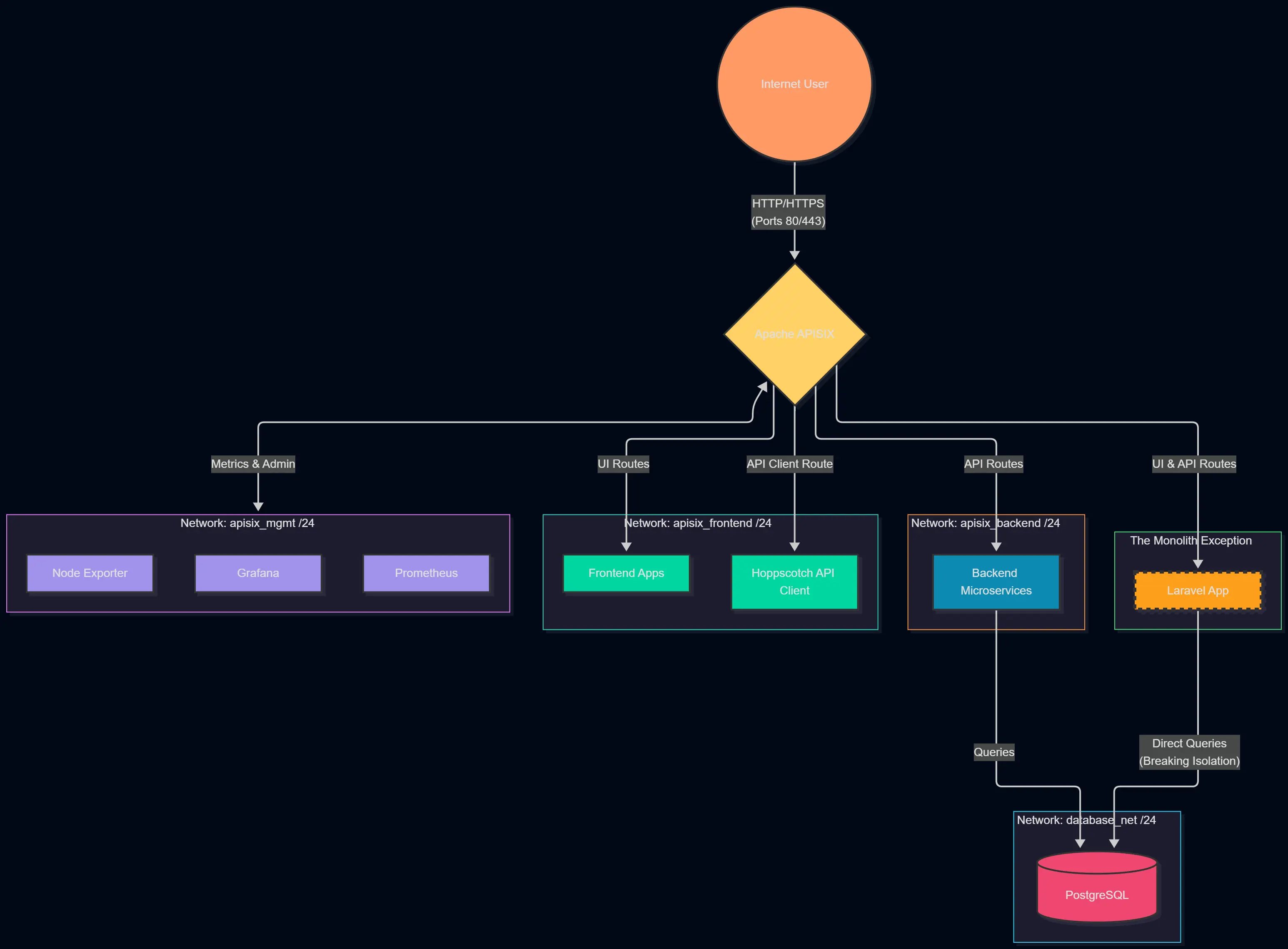
-
Deploy the Gateway and Monitoring Tools
The process of this deployment is quite easy. Using my configuration, you will only need to adjust a couple of settings if you have to. Otherwise, you could just run docker compose up -d and the tools will be deployed right away. Things that you need to configure after deploying the gateway though:
- SSL Certificates.
- DNS Records.
-
Deploy the Databases
Same goes for the deployment of the databases. Using my configuration, you just need to choose your database of choice (currently only PostgreSQL is available) and add your own .env file. pgAdmin should also be deployed alongside PostgreSQL. Following that, docker compose up -d should do the job.
-
Deploy the API Client
As previously mentioned, I went with Hoppscotch due to its web-based, self-hosted setup. This means I can access my services and gateway configuration from anywhere. But this ease of use requires security which we’ll discuss later. Since the Hoppscotch containers are within the same network as apisix_frontend, setting up a proxy server means I can resolve the host names using my Docker container name plus its port. How cool is that?
-
Then, Deploy Whatever
Well then you’re set. I found this configuration to be pretty nice and structured. Everything’s laid out where you'd expect it to be. If you need to deploy a frontend or a backend application, you can configure a Docker Compose file, attach that container to the appropriate Docker networks we’ve configured and add the route to APISIX.
-
Security Notes
Because this is exposed on a public VPS, I locked down the basics. I changed the APISIX admin key and kept port 9180 off the public interface, replaced Grafana's default credentials, limited Hoppscotch to Google OAuth with restricted sign-ups, published only ports 80/443, kept Postgres internal to database_net, and kept .env files out of Git. pgAdmin is not exposed publicly at all. It's reachable only from within the VPS, or from my local machine through a temporary SSH port forward. This is a baseline, not a guarantee, and I'd welcome feedback.
The Struggles
-
APISIX Can’t be Deployed with WSL SSH
There’s one annoying issue when trying to deploy APISIX with Docker through WSL. I’ve had the Docker Compose file ready in my local machine, and I tried to execute the command docker --context vps compose up -d. And the issue is, there’s a file naming mismatch between Windows and WSL that disallows me to mount the correct APISIX volume path to Docker. From that issue arose two options. Either we can use SCP to transfer the configuration over to our server, or we can use Git version control and clone the file in our server. I chose the latter for the reason of version control and public access. All the adjustments I or someone else made to the Docker Compose file can be versioned and provisioned really well with Git.
-
Hoppscotch First Tweaks are a Pain
Adjustment regarding Google OAuth login was a pain. But then I’ve realized that the only tweaks I need to implement are in the .env. So that was my bad, but a learning experience nonetheless. A good reminder to read the docs first.
-
Networks are Confusing at First (In a Good Way)
I’ve only learned the theory of networking, but implementing it is confusing at first. My confusion came from deciding which hosts belong to what network, and trying to split them accordingly. In the end I’ve gone with the setup mentioned previously, which consists of 4 Docker network segments.
-
Monolith Apps are, Well, Yeah They Exist
Ideally, the frontend should NOT be able to tell the existence of a database through this network setup. Yet in practice, my friends and I have developed a monolithic Laravel application that requires direct connection to the database, contradicting my network theory setup. Rendering UI while handling logic themselves is the nature of monolithic apps, which is a compromise I’ve accepted for now. So I had to attach the database_net network to that app’s container.
What’s Next?
Well I’ve been planning to explore other database options, Loki for logging capabilities, security expansion, Infrastructure as Code (IaC) and much more. This is a good baseline to have to get me going on this journey. Thanks for reading.
References Mentioned
https://github.com/JosaphatCornelius/personal-vps-infrastructure